
 Developer Tools
HeaderDesk: HTTP header editor for Chrome
Change a header. See that it was sent.
Modify HTTP request and response headers, per site
- New · no ratings yet
- v1.0.0
- 632 KB
- updated Nov 2026
- by Iliass El Barhoumi
 Add to ChromeFree
See it in action
What HeaderDesk does.
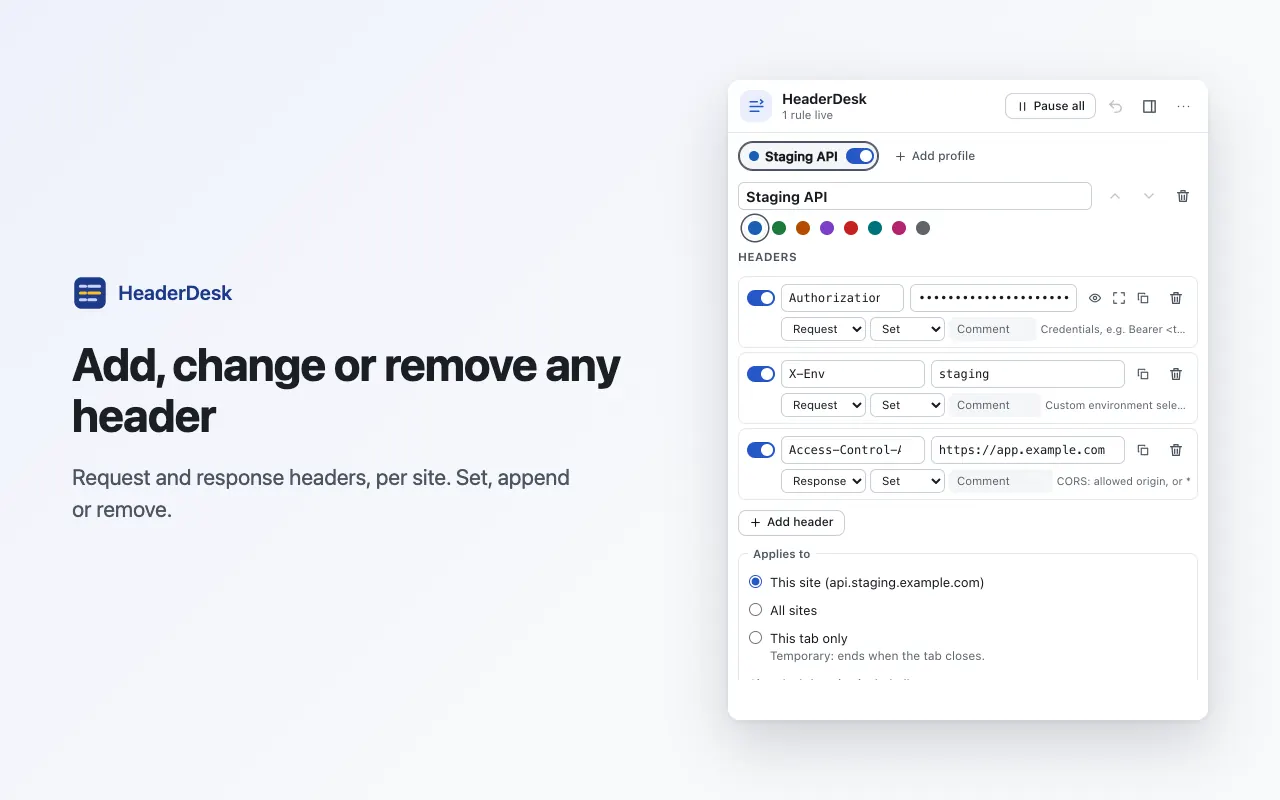
Add, change or remove request and response headers with set, append or remove; each row has its own on/off switch and a comment
Header name suggestions with a short hint for common headers: Authorization, Accept-Language, Cache-Control, Content-Security-Policy and more
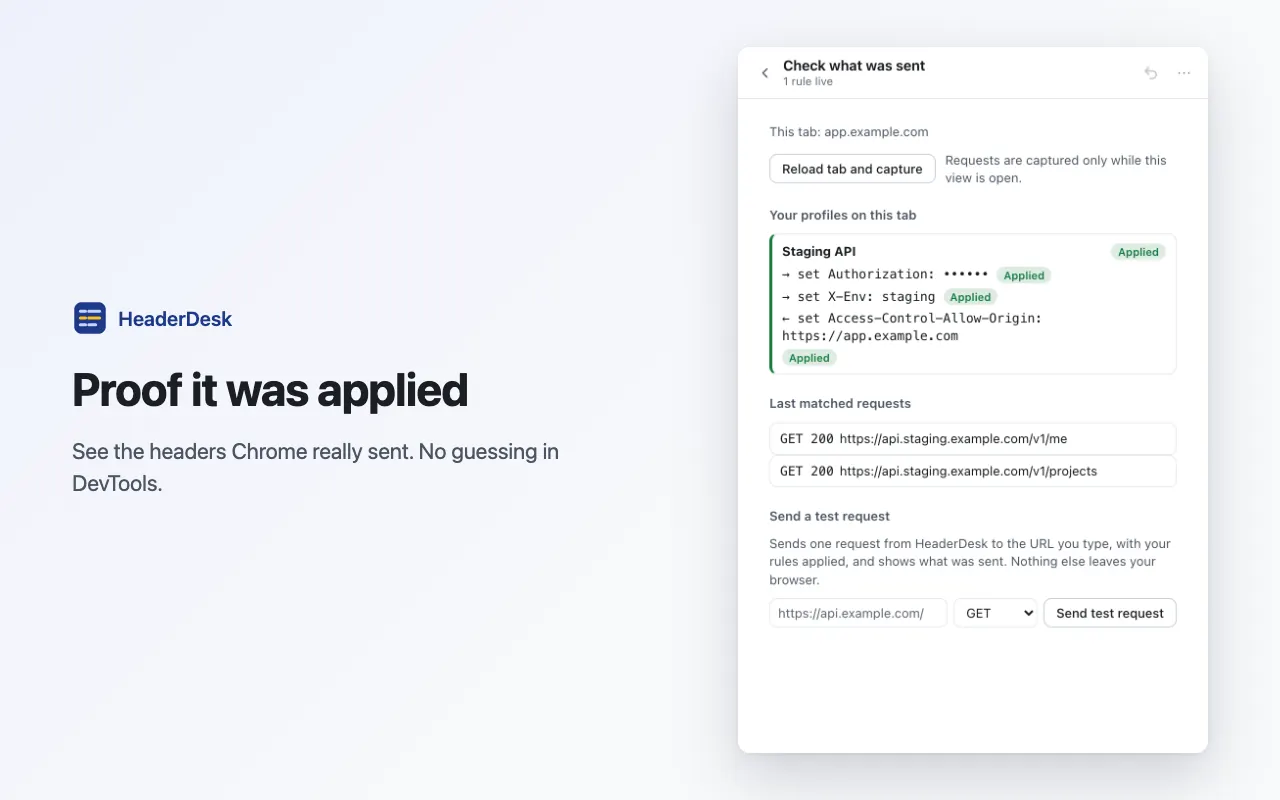
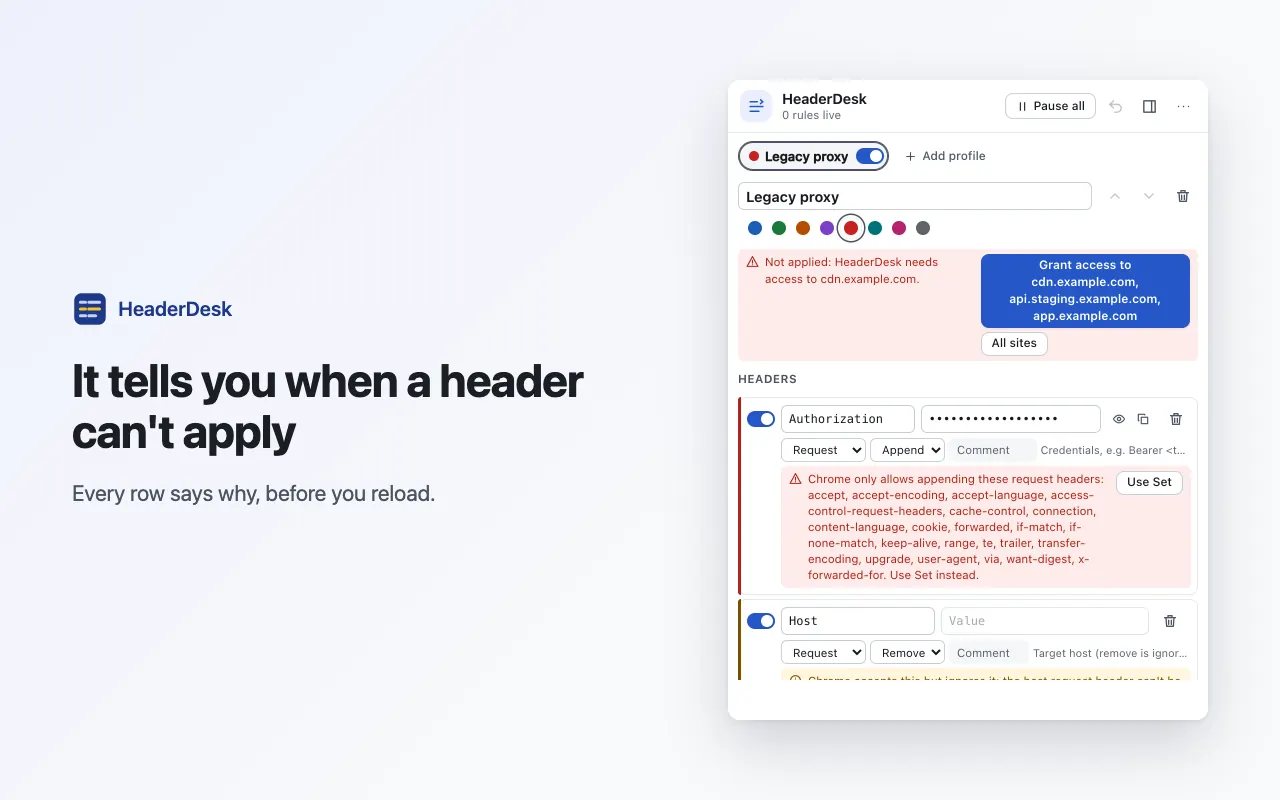
Check view: the request and response headers Chrome really sent and received, and why a header was not applied (missing site permission, a header Chrome ignores, another extension overriding it)
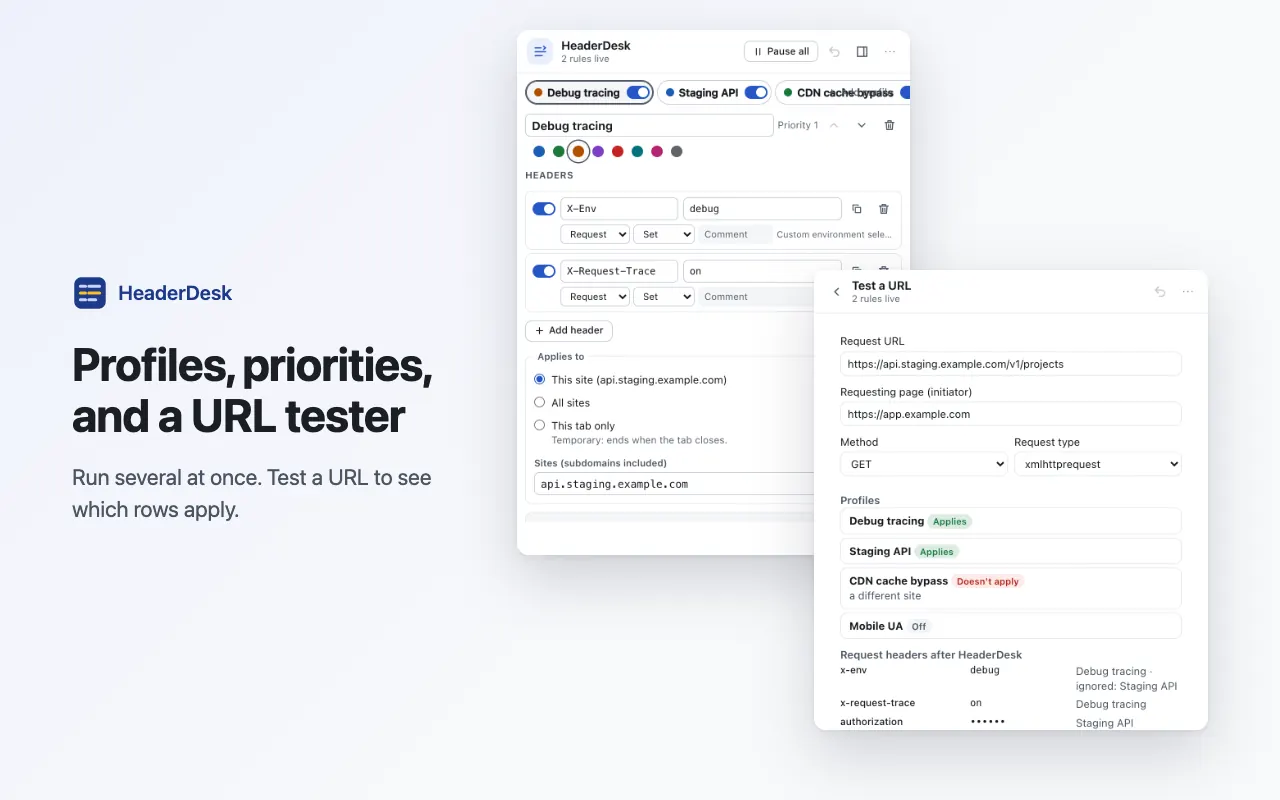
Profiles, several active at once; drag to reorder, the top profile wins
Scope a profile to all sites, chosen sites or this tab only, and filter by URL pattern or regex, request domain, initiator domain, resource type and HTTP method
Redirect rules: send a URL to another one, or rewrite it with a regex and \1 groups, scoped by the same sites and filters as the headers
"Test a URL" shows which rows apply to an address, where it redirects, and why
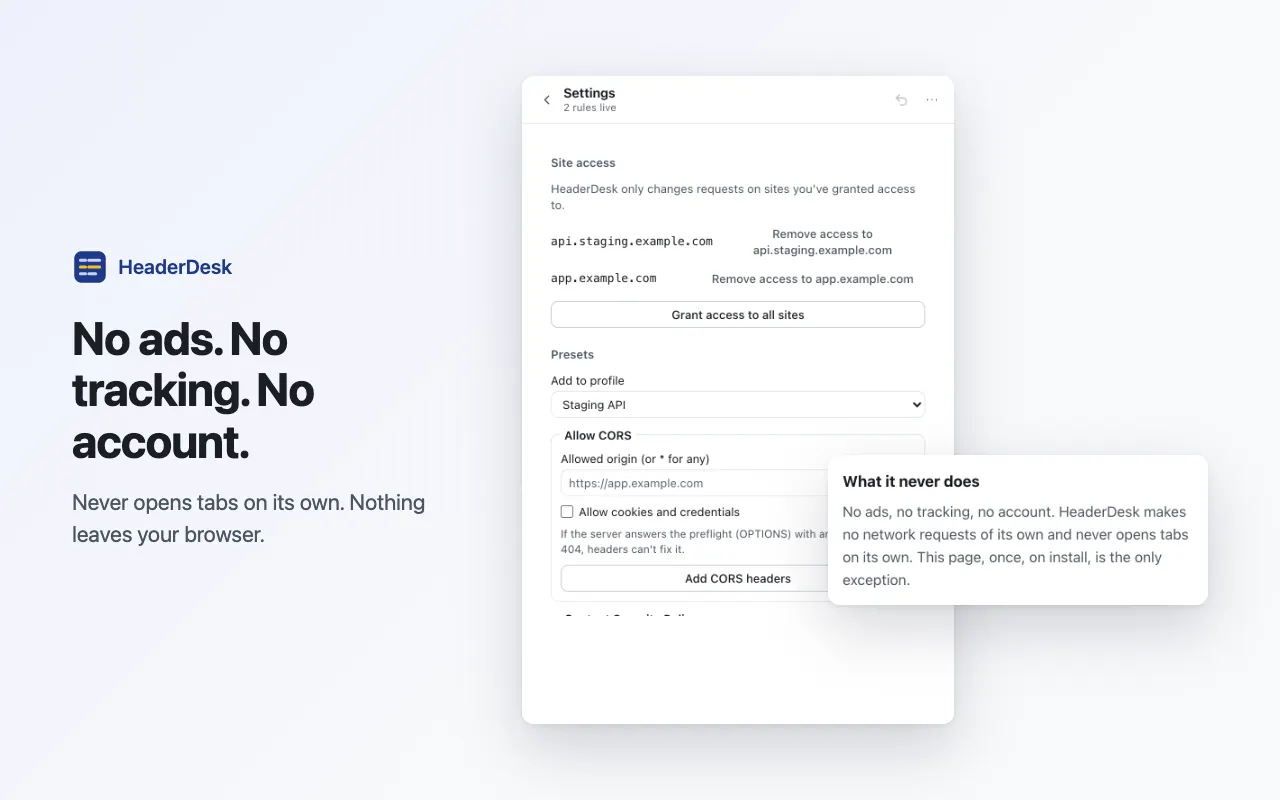
One-click "Allow CORS" preset for the Access-Control response headers, with its limits explained (no wildcard origin with credentials, no fix for a preflight that fails with an error status)
Problems flagged on the row as you edit; a broken row is skipped and the rest keep working
Pause everything with one click or Alt+Shift+H; the badge shows how many headers are active
Autosave on every edit, undo for deleted rows and profiles, and the last 10 backups kept locally before every import and update
Cookie helpers: send chosen cookies, or add a Set-Cookie with Path, Domain, Max-Age, SameSite, Secure, HttpOnly and Partitioned, with the browser's rules checked before it is added
Paste headers as "Name: value" lines (copies from DevTools and curl work), duplicate a profile, or copy one as text to share, with secrets masked
Keyboard shortcuts to turn your first four profiles on or off
Export and import profiles as JSON; imports exports from ModHeader, Requestly and Header Editor, and lists anything it could not bring over
Sensitive values such as Authorization and Cookie are masked on screen and in exports by default
No install warning: site access is asked per profile when you set it up, and every allowed site is listed with a remove button
Popup or resizable side panel; interface translated into 51 languages
No network requests of its own, no content scripts, no analytics, no account
How HeaderDesk works
HeaderDesk is a header editor for developers and testers, in a popup or a resizable side panel. Add, change or remove HTTP request headers and response headers with set, append or remove, each row with its own on/off switch and a comment, and with name suggestions and short hints for common headers such as Authorization, Accept-Language, Cache-Control and Content-Security-Policy. Group rows into profiles, several active at once, and drag to reorder: the top profile wins. Scope a profile to all sites, chosen sites or this tab only, and filter by URL pattern or regex, request domain, initiator domain, resource type and HTTP method; "Test a URL" shows which rows apply to an address and why. The Check view shows the request and response headers Chrome really sent and received, so you don't have to guess, and when a header isn't applied the row says why: a missing site permission, a header Chrome ignores, or another extension overriding it. A one-click "Allow CORS" preset adds the Access-Control response headers and is honest about what headers can't fix. Pause everything with one click or Alt+Shift+H. Every edit autosaves, deleted rows and profiles can be undone, and HeaderDesk keeps the last 10 backups locally before every import and update. Export and import profiles as JSON; it also imports profiles exported from ModHeader. Installing shows no "read and change all your data" warning: HeaderDesk asks for the sites a profile uses when you set it up, or all sites in one click if you prefer, and lists every site you allowed with a remove button. It makes no network requests of its own except a test request you click, has no content scripts and no account, and the interface is translated into 51 languages.
HeaderDesk and your data
What it uses
- Profiles and settings (stored locally)
Your profiles, header rows and settings, and up to 10 automatic backups of them. Header values are stored as you typed them, because they are the rules. Kept in Chrome's extension storage on your device and never sent anywhere. - Usage counts (stored locally)
When HeaderDesk was installed, how many successful changes it has seen, on how many days, and your answers to the optional support and rating cards. Numbers and times only, with no site names and no header data. They stay on your device. - Check-view request logs (memory only) (optional)
The headers of requests that match your active rules, captured only while the Check view is open, with sensitive values masked. Kept in that view's memory, never written to disk, and gone when you close it.
Never collected
- Header values and tokens you type — they stay on your device, and exports mask sensitive values unless you choose to include them
- Page contents — HeaderDesk has no content scripts
- Browsing history — HeaderDesk keeps no list of pages
- Your Google account, name, email or any personal identifiers — there is no account
Permissions HeaderDesk asks for
Modify headers (declarativeNetRequestWithHostAccess)
The core of the extension: applies your header rules through Chrome's declarativeNetRequest API, and only on the sites you allowed. It has no install warning of its own.
Site access, only for the sites you allow (optional)
Nothing is granted at install. When you scope a profile, Chrome asks for the sites it targets and the site that makes the requests (Chrome needs both for fetch and XHR), or for all sites if you choose "All sites". Every allowed site is listed in HeaderDesk with a remove button.
Active tab
Reads the address of the current tab after you click the toolbar button, so HeaderDesk can offer "this site" as the scope of a new profile. It gives no access to the page itself.
Read request headers (webRequest)
Observation only, for the Check view: shows the request and response headers Chrome actually sent and received for requests that match your rules. It listens only while the Check view is open, never blocks or changes a request, and adds no install warning.
Storage
Keeps your profiles, header rows, settings, up to 10 automatic backups and a few local usage counts on your device.
Side panel
Lets you open HeaderDesk in Chrome's side panel as well as the popup.
What’s new in HeaderDesk
- v1.0.0Nov 2026
Initial release. Request and response headers with set, append and remove; redirects (URL or regex); profiles with site, tab and URL filters; Check view of the headers actually sent and received; "Test a URL"; "Allow CORS" preset; pause with Alt+Shift+H; autosave, undo and local backups; JSON export and import, including exports from ModHeader, Requestly and Header Editor; cookie helpers; paste headers, duplicate and share a profile as text; profile shortcuts; per-site access; popup and side panel; 51 languages.
HeaderDesk questions, answered
Why doesn't HeaderDesk ask for access to all sites at install?
Because it doesn't need it. When you scope a profile, Chrome asks for the sites that profile uses. "All sites" is one click if you prefer it, and every allowed site can be removed in HeaderDesk.
How do I know a header was really sent?
Open the Check view. While it is open it lists the requests on the current tab that match your rules, with the headers as Chrome sent and received them. If a rule matched nothing, it says why: no matching request yet, a scope mismatch, a missing site permission, a header Chrome ignores, or another extension overriding it.
Why does my header change nothing on an API call?
For fetch and XHR, Chrome applies header rules only when the extension may access both the API's site and the site of the page making the call. HeaderDesk asks for both when you scope a profile and flags the profile when one is missing.
Can it fix CORS errors?
Often. The "Allow CORS" preset adds the Access-Control response headers your browser checks. It can't fix a preflight that the server answers with an error status, can't use a wildcard origin with credentials, and changes only what your browser sees, not what the server allows. HeaderDesk says so in the preset.
Can I bring my profiles from ModHeader?
Yes. Import a profile file exported from ModHeader, or HeaderDesk's own JSON. HeaderDesk saves a local backup before every import, so you can restore the previous state. HeaderDesk is not affiliated with ModHeader.
Does HeaderDesk collect any data?
No. It makes no network requests of its own except a test request you click, has no account and no analytics, and keeps your profiles on your device. Check-view logs live only in memory while that view is open.