 Developer Tools
Lineform
Your drawing, whole and sharp. Nothing uploaded.
Open DXF, DWG and 3D models in Chrome, offline
- New · no ratings yet
- v1.2.1
- 5.5 MB
- updated Nov 2026
- by Ilias El Barhoumi
See it in action
What it does.
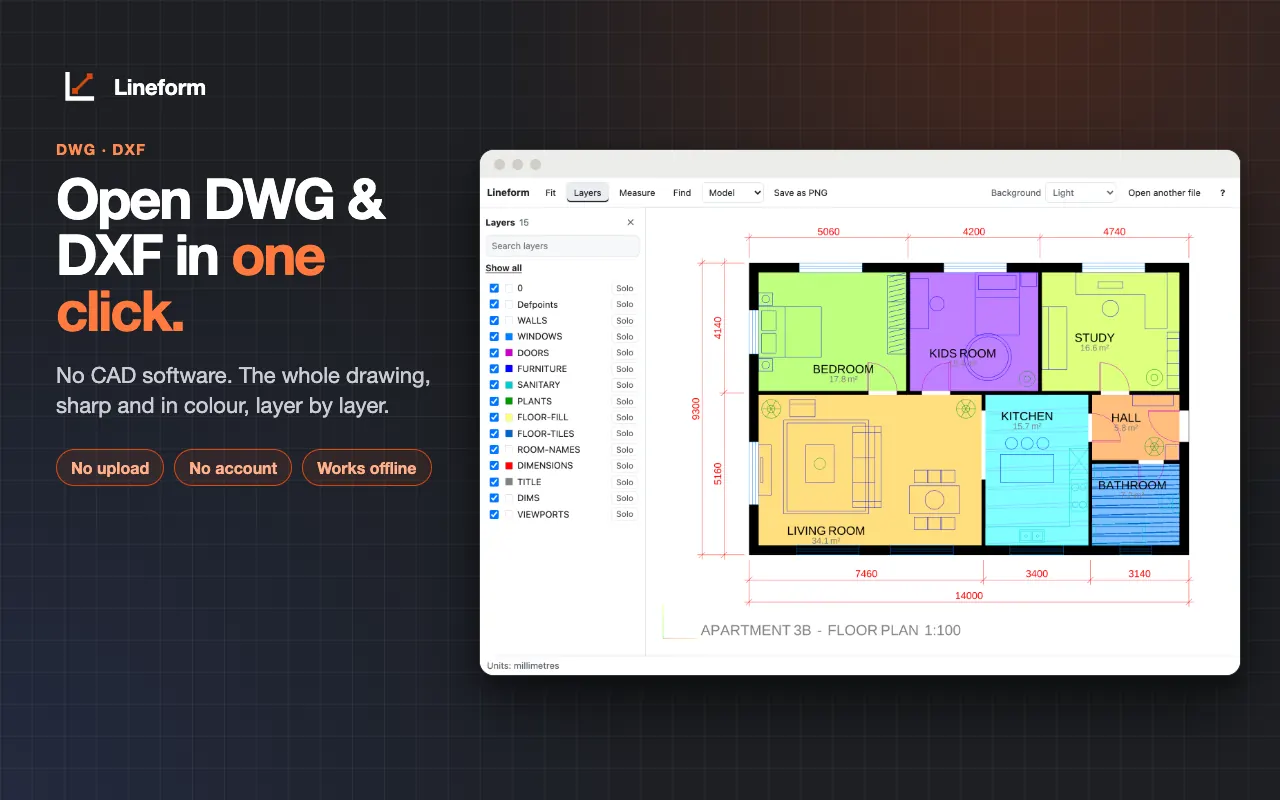
DWG viewer: AutoCAD R13 to 2018, files up to 8 MiB
DXF viewer: the whole drawing, sharp at any zoom, with line weights, line types and text; large DXF files open in fast mode
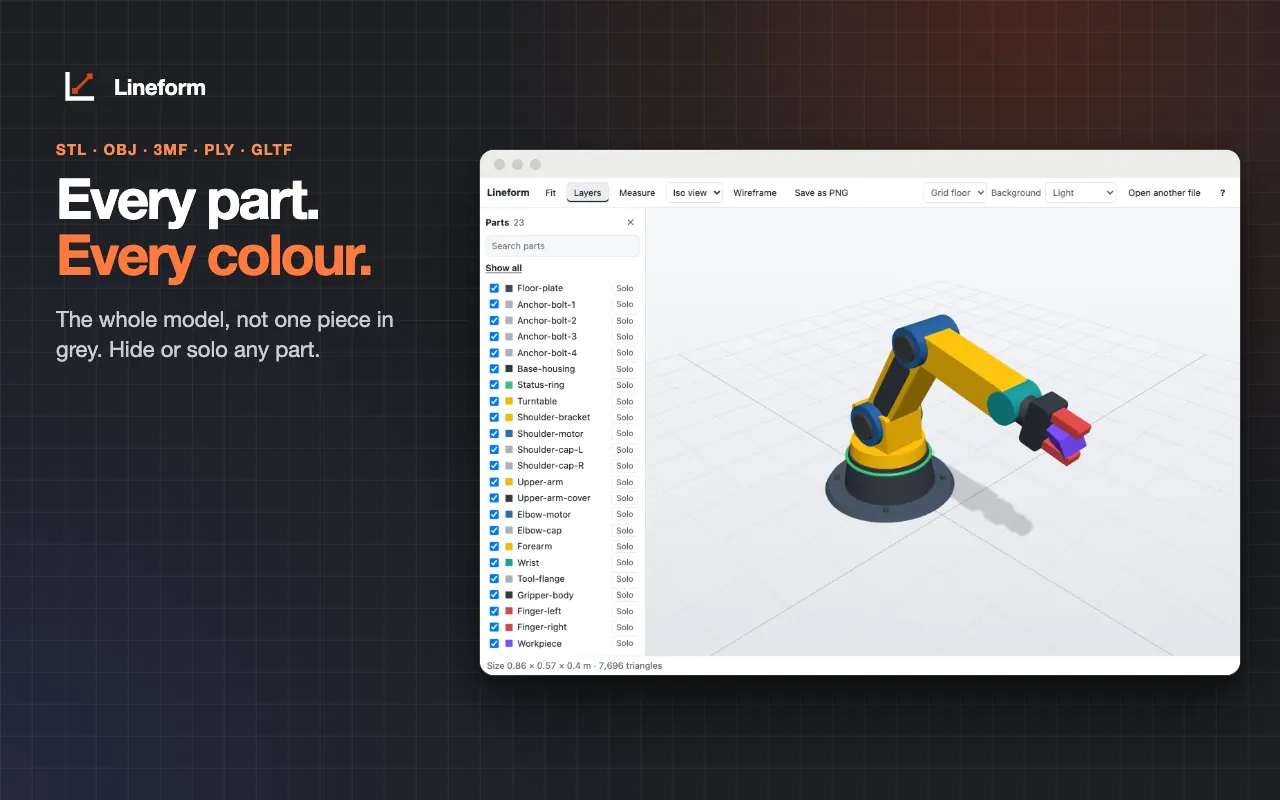
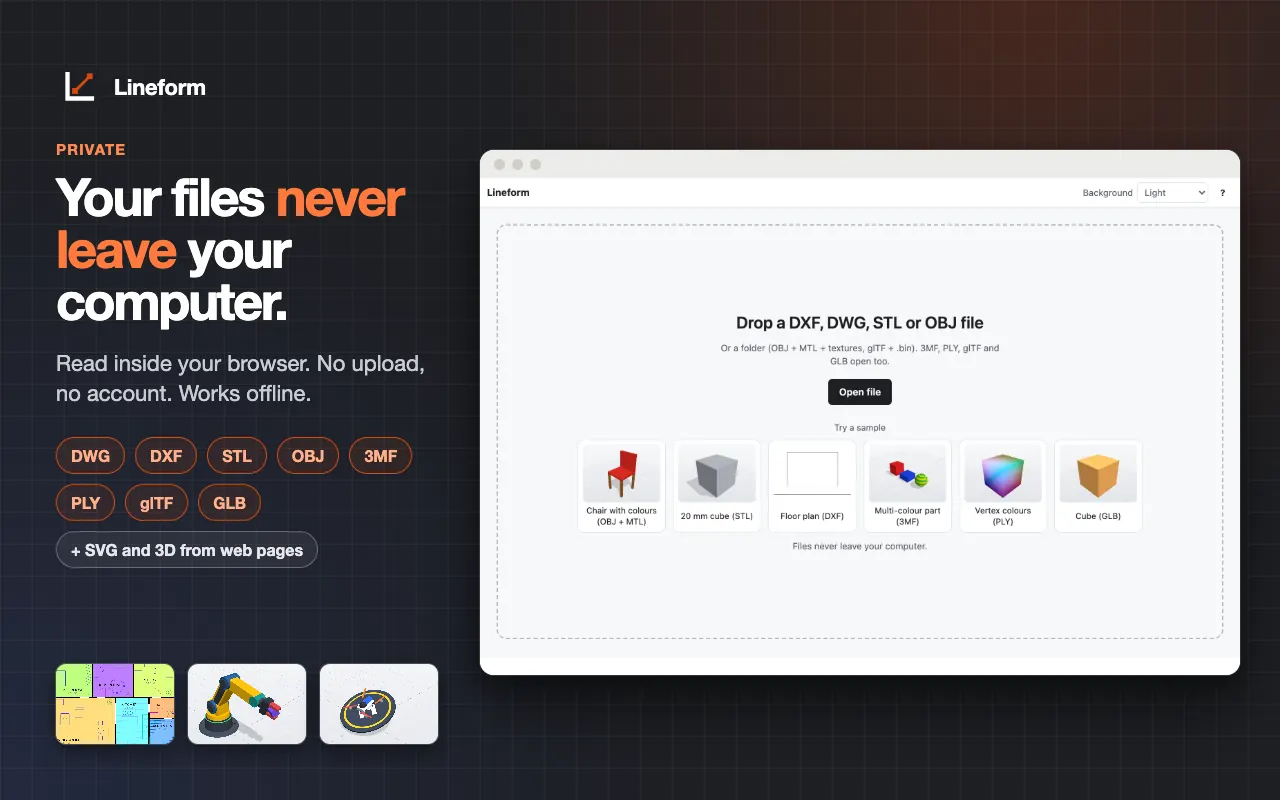
3D model viewer: STL, OBJ with MTL and textures, 3MF, PLY, glTF and GLB, with orbit, zoom, wireframe and iso, top, front and side views
Layers: search, hide, show all, or solo one layer (hover to preview)
Layouts: switch between model space and the drawing's layouts
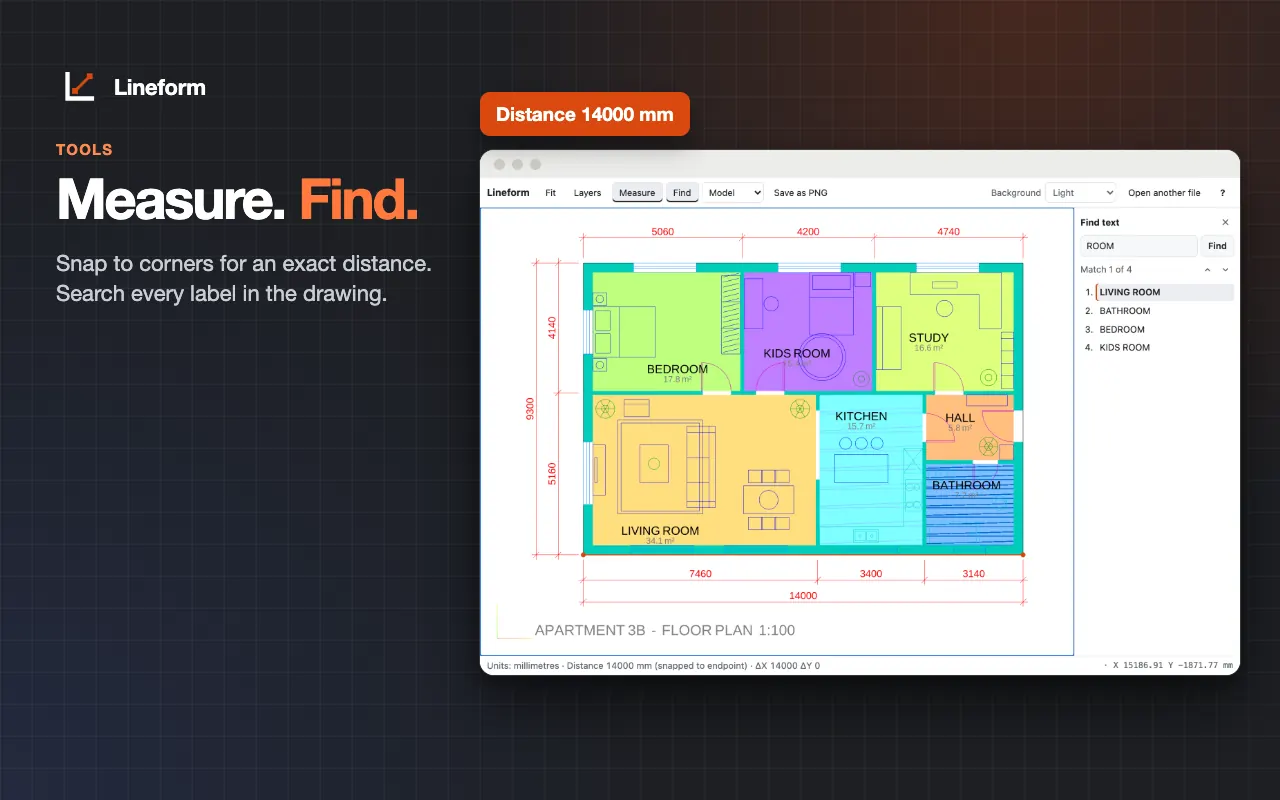
Measure: click two points for a distance in the file's units, in 2D and 3D, with snapping to endpoints and midpoints in 2D
Find text: search every label and note in a drawing
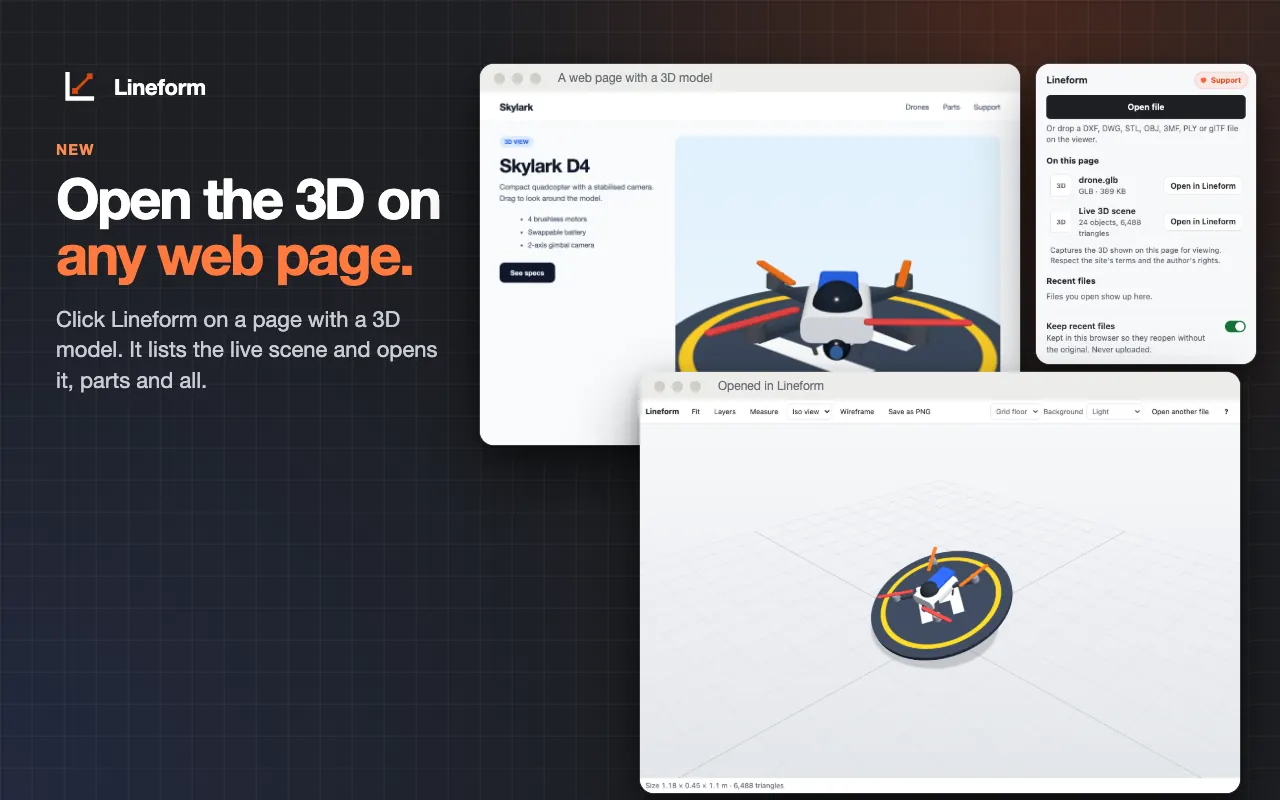
New in 1.1: open the 3D or 2D on a web page, including model files, SVG drawings and live WebGL2 3D scenes with base colours and textures
Toolbar button, right-click "Open the 3D or 2D on this page", or Alt+Shift+D
Open from anywhere: drag and drop, Open file, a local file in Chrome, or right-click a link and choose "Open in Lineform"
Save the current view as a PNG; light, dark (CAD black) or automatic background
Recent files reopen in one click, even if the original moved; turn that off any time
No upload, no account, no ads, no analytics; works offline
The long version
Lineform opens CAD drawings and 3D models right in Chrome, from wherever the file is: drop it on the page, click Open file, open a local file in Chrome, or right-click a link and choose "Open in Lineform". It reads DXF, and DWG from AutoCAD R13 to 2018 (up to 8 MiB), and shows the whole drawing sharp at any zoom, with line weights, line types and text, and it tells you plainly if something could not be drawn. Search, hide or solo layers, switch between model space and the drawing's layouts, click two points to measure in the file's units with snapping to endpoints and midpoints, and find any label or note. 3D models open too: STL, OBJ with MTL and textures, 3MF, PLY, glTF and GLB, with orbit, zoom, wireframe and iso, top, front and side views. New in 1.1: click Lineform on a page that shows a 3D model or a drawing, and open it in the viewer. It finds the model files the page loaded, SVG drawings, and live WebGL2 3D scenes with their base colours and textures; the toolbar button, the right-click item "Open the 3D or 2D on this page" and Alt+Shift+D all do it. Save the current view as a PNG, pick a light, dark (CAD black) or automatic background, and reopen recent files in one click, even if the original moved. Files are read inside your browser: there is no upload, no conversion server, no Google Drive access, no account, no ads and no analytics, and it works offline. It is view and measure only, and the interface is translated into 51 languages. This free version opens one file of your own (that file reopens any time, and the built-in samples always open); for the unlimited version, email hello@extensionshop.store and you get a personal code to type into Lineform, with still no account. An optional Ko-fi tip supports the work.
Your data, plainly
What it uses
- Free-version status (stored locally)
A fingerprint (SHA-256 hash) of the first file you opened, so that same file keeps opening, and whether Lineform is unlocked, with the code you typed. Never the file itself or its name. Kept in Chrome's extension storage on your device and never sent anywhere. - Recent files (stored locally) (optional)
The files you opened, with their side files (such as an OBJ's .mtl and textures), name, format, size, open time and a small preview picture, so they reopen later. Kept in IndexedDB in your browser, capped at 500 MB by default, and you can remove them, clear all or turn this off. - Settings (stored locally)
Recent files on or off, background, default 3D units and the recent-files size cap, plus your theme choice. Kept in your browser and never sent anywhere. - Usage counts (stored locally)
How many files you opened, on which days, how many opened cleanly or failed, and your answers to the optional support and rating cards. Numbers and dates only, never file names or contents. They stay on your device.
Never collected
- The drawings and models you open — they are read and drawn inside your browser, with no upload and no conversion server
- The content of the pages you visit — Lineform reads a page only after you click its button, shortcut or menu item there, and then only the item you pick
- Browsing history — Lineform keeps no list of pages
- Your Google account, Google Drive, name, email or any personal identifiers — there is no account
Why it asks
Storage
Small counters and answers for the optional support and rating cards. Recent files and viewer settings are kept in IndexedDB on your computer.
Unlimited storage (unlimitedStorage)
Keeps recent files whole so they reopen without the original, and stops Chrome clearing them when disk space runs low. You set a cap (500 MB by default) and can turn recent files off.
Context menu (contextMenus)
Adds "Open in Lineform" to links that look like CAD or 3D files, and "Open the 3D or 2D on this page".
Open local files (declarativeNetRequestWithHostAccess, file:///*)
Sends a CAD file to the viewer instead of Chrome downloading it or showing raw text. It matches only local files, when you turn on "Allow access to file URLs" for Lineform, and CAD file links on sites you allowed. Lineform never reads any other local file.
Current tab, when you ask (activeTab, scripting)
After you click the toolbar button, press Alt+Shift+D or use the right-click item, Lineform gets temporary access to that one tab to list the 3D models and drawings on it, and reads only the one you pick. Never other tabs, never in the background.
Site access, optional (http and https)
Never asked at install. When you choose "Open in Lineform" on a link, Chrome asks for that one site, and Lineform downloads only that file. You can remove the site any time in chrome://extensions.
What’s new
- v1.2.1Nov 2026
Draftpane is now called Lineform. Nothing else changes: your recent files, settings and unlock code carry over.
- v1.2.0Oct 2026
This free version opens one file of your own; the same file reopens any time and the samples always open. The unlimited version is available on request (hello@extensionshop.store) with a personal code you type into Lineform, offline.
- v1.1.0Oct 2026
Open the 3D or 2D on a web page: model files the page loaded, SVG drawings and live WebGL2 3D scenes with base colours and textures, from the toolbar button, the right-click menu or Alt+Shift+D.
- v1.0.0Oct 2026
Initial release. DXF and DWG (R13 to 2018) drawings and STL, OBJ, 3MF, PLY, glTF and GLB models; layers, layouts, measure with snap, find text; PNG export; light, dark and automatic background; recent files; "Open in Lineform" on links.
Questions, answered
Does Lineform upload my drawings?
No. Files are read and drawn inside your browser. There is no upload, no conversion server and no Google Drive access, and everything except opening a link you chose works offline.
Which DWG versions does it open?
DWG from AutoCAD R13 to 2018, up to 8 MiB. For a bigger DWG, save it as DXF in your CAD program; large DXF files open in fast mode. Very old R11 and 2.10 files don't open.
Which 3D formats does it support?
STL, OBJ (with MTL and textures), 3MF, PLY, glTF and GLB. STEP, IGES, IFC and Revit files are not supported: export a DWG, DXF, STL or glTF instead.
Can it open the 3D model shown on a web page?
Yes, since 1.1. Click the toolbar button, press Alt+Shift+D or right-click and choose "Open the 3D or 2D on this page". Lineform lists the model files, SVG drawings and live 3D scene on that page and opens the one you pick. Live scenes work on WebGL2 pages, with base colours and textures only; Lineform says so when a page can't be captured. Respect the site's terms and the author's rights.
Which permissions does it need?
storage, unlimitedStorage, contextMenus, declarativeNetRequestWithHostAccess, activeTab, scripting and access to local files, plus optional per-site access that Chrome asks for only when you open a link from that site. Lineform reads a page only after you click its button, shortcut or menu item there.
Can I edit drawings?
No. Lineform is for viewing and measuring only.
Is Lineform free?
This free version opens one file of your own, and that file reopens any time; the built-in samples always open. For the unlimited version, email hello@extensionshop.store and you get a personal code to type into Lineform. There are no ads and no account, and the code works offline. An optional Ko-fi tip supports the work.