Best Screen Time Tracker for Chrome in 2026
Spending too much time online? We compare the top screen time trackers for Chrome and explain why Aware Pro stands out with its Apple-inspired interface and zero-setup approach.
The average person spends over 7 hours a day online. But how much of that time is productive, and how much is lost to mindless scrolling? Screen time tracking has moved beyond phones — if you work in a browser all day, you need visibility into where your hours go.
Why Track Screen Time in Your Browser?
Unlike phone screen time tools, browser-based trackers capture the full picture of your workday. Every tab, every site, every minute — categorized and visualized so you can make better decisions about how you spend your time online.
What Makes a Great Screen Time Tracker?
- Automatic tracking — no manual timers or start/stop buttons
- Smart categorization of websites into meaningful groups
- Clear visualizations with daily and weekly views
- Privacy-first design — your data stays on your device
- Lightweight — no impact on browser performance
Aware Pro: Screen Time Done Right
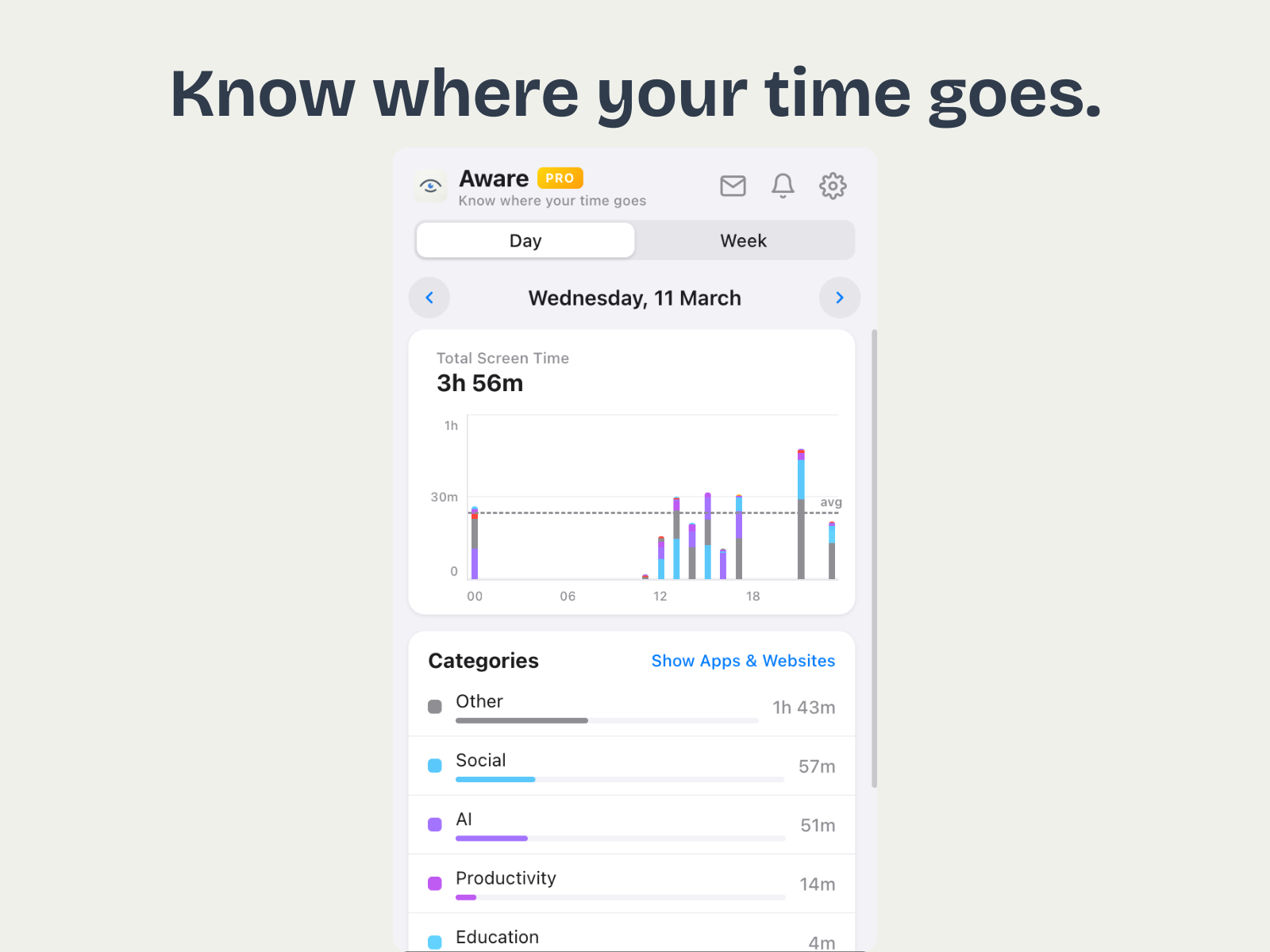
Aware Pro takes inspiration from Apple's Screen Time interface and brings it to Chrome. The moment you install it, tracking begins automatically. No accounts, no setup, no manual timers. Open the popup and you'll see a beautiful hourly stacked bar chart showing exactly how your day breaks down.
With smart categorization covering 200+ popular websites, Aware groups your activity into categories like Social Media, Entertainment, Productivity, AI, Education, and more. Switch between Day and Week views to spot trends and patterns in your browsing habits.
Free vs. Pro — What Do You Get?
The free version gives you daily tracking with hourly breakdowns and category grouping. Upgrading to Pro ($3.99) unlocks unlimited history, full site lists with detailed breakdowns, weekly summary notifications every Monday, and advanced statistics. A 7-day free trial is included so you can try everything before committing.
Privacy-First by Design
All your browsing data stays on your device. Aware never sends your activity to any server — there's no cloud sync, no accounts, and no tracking beyond what you see in the extension. The only external communication is anonymous feature usage analytics (like "popup opened") and license validation for Pro users.
Final Verdict
If you want a clean, private, zero-effort screen time tracker for Chrome, Aware Pro is the best option in 2026. It does one thing and does it beautifully. Install it from the Chrome Web Store and start understanding where your time actually goes.